
 Calorie Tape for iPhone
Apple Health
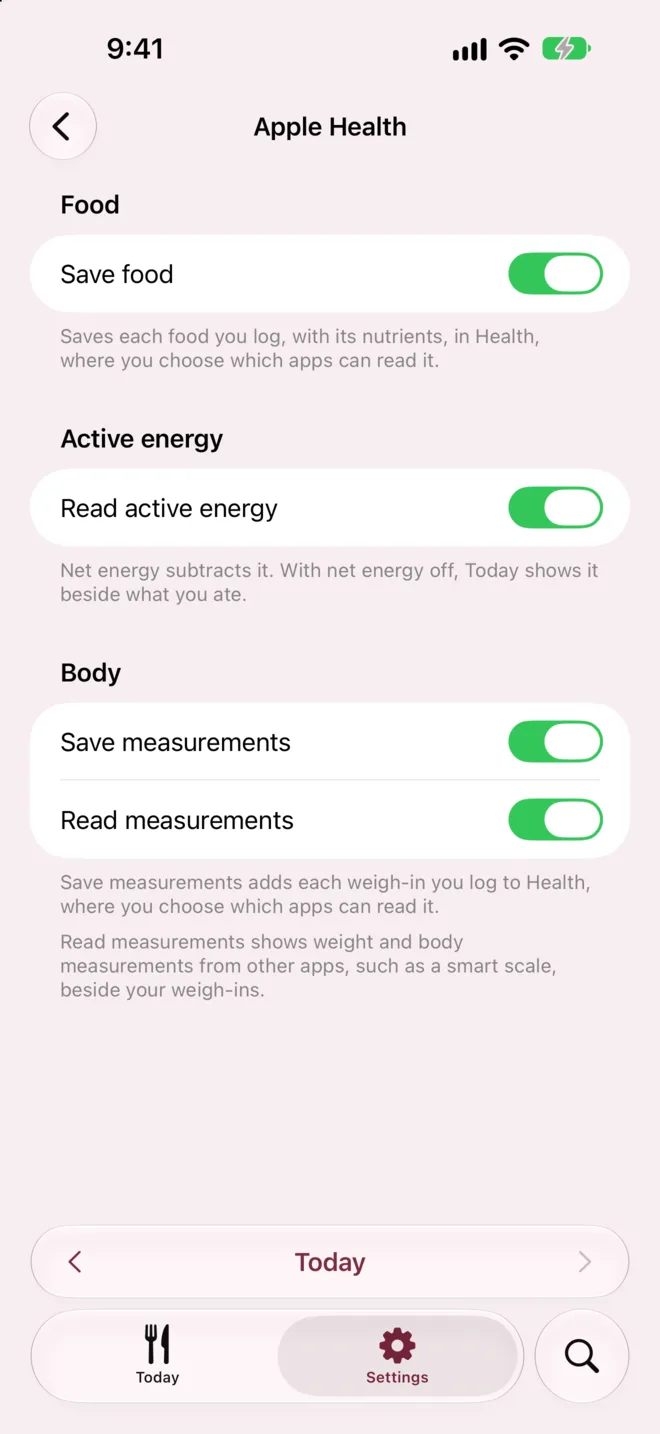
Save the foods you log and your weigh-ins to Apple Health. Show your active energy and a smart scale's readings beside your log. Each of the 4 switches is off until you turn it on.


iPhone · iOS 27 or later · No account needed
How it works
Open Settings and tap Apple Health.
Turn on Save food, Read active energy, Save measurements or Read measurements.
Choose what to allow when Health asks for permission.
What it can't do
- Switches
- Set on each iPhone
- The switches stay on each iPhone, so turn them on separately on each one.
- Symptoms and stools
- Not saved
- Symptoms and stools from How You Feel aren't saved to Apple Health.
- Health data in exports
- Left out
- Exports leave out active energy and the measurements read from Health.
- Active energy on the widget
- Can lag
- With net energy on, the widget uses the active energy the app last read, so its calories left can lag until you open the app.
Questions
Does Calorie Tape send my Health data to its servers?
No. Health data is never sent to us. Nothing Calorie Tape reads from Health is stored in your log or synced to iCloud. That includes the sex, birth date and height the target calculator can fill in.
Which nutrients go to Apple Health?
Each food you log goes to Health with every nutrient it reports that Health has a type for, up to 38 nutrients. A nutrient the food doesn't report isn't written, not even as zero. Water is left out, since Health would count it as water you drank.
What happens to my data in Health if I turn off Save food or Save measurements?
Calorie Tape asks whether to keep what it saved in Health or remove it. Deleting the app leaves your food and weigh-ins in Health.
Related
Get Calorie Tape
Calorie Tape is on the App Store for iPhone. It needs iOS 27 or later. Every feature is free today.