
 Calorie Tape for iPhone
Nutrient tracker
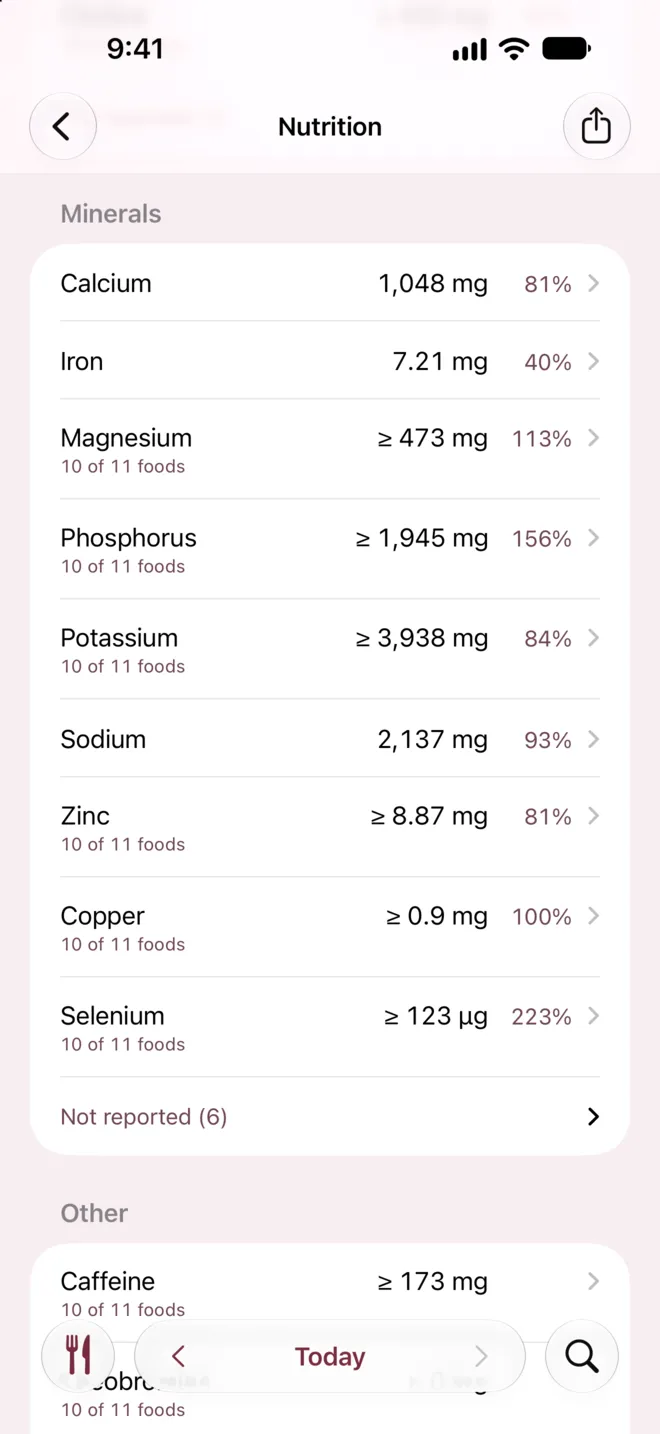
See every nutrient your foods report, up to 65 nutrients per food, including vitamins and minerals. Tap any nutrient to see which foods it came from.


iPhone · iOS 27 or later · No account needed
How it works
On Today, tap All Nutrients under the summary.
Tap a nutrient, like Iron, to see which foods supplied it.
Choose Last 7 Days to see each nutrient's daily average.
What it can't do
- Packaged foods
- About 14 nutrients
- Packaged foods usually report about 14 nutrients from their label, while USDA's generic foods report 65.
- Vitamin and mineral targets
- FDA Daily Values
- Vitamin and mineral targets use the FDA Daily Values, and Daily targets sets only calories, protein, carbs, fat and fiber.
- Longest view
- 7-day average
- Calorie Tape has no charts of nutrients over time, and its longest view is a 7-day average.
- Estimated nutrients
- Left unknown
- Open Food Facts estimates some nutrients from ingredient lists, and Calorie Tape leaves those unknown.
Questions
What does "—" mean?
A dash means the food doesn't report that nutrient. A missing nutrient shows as unknown, not zero.
What does "≥" mean on a total?
Some of the day's foods don't report that nutrient, so the real total is at least that much. The line beneath says how many foods reported it, like "10 of 11 foods".
Where do the nutrient values come from?
The values come from USDA FoodData Central, Open Food Facts, foods other people shared through Shared Foods, or values you typed or read from a label. Each food names its source under its name. USDA's generic foods say USDA FNDDS.
Related
Get Calorie Tape
Calorie Tape is on the App Store for iPhone. It needs iOS 27 or later. Every feature is free today.