
 Calorie Tape for iPhone
Fiber tracker
Today shows your fiber beside calories, protein, carbs and fat. Calorie Tape measures your fiber against a daily minimum, 28 grams unless you set your own.


iPhone · iOS 27 or later · No account needed
How it works
Tap the summary at the top of Today to open Daily targets.
Under Fiber, type your own daily minimum if you want one.
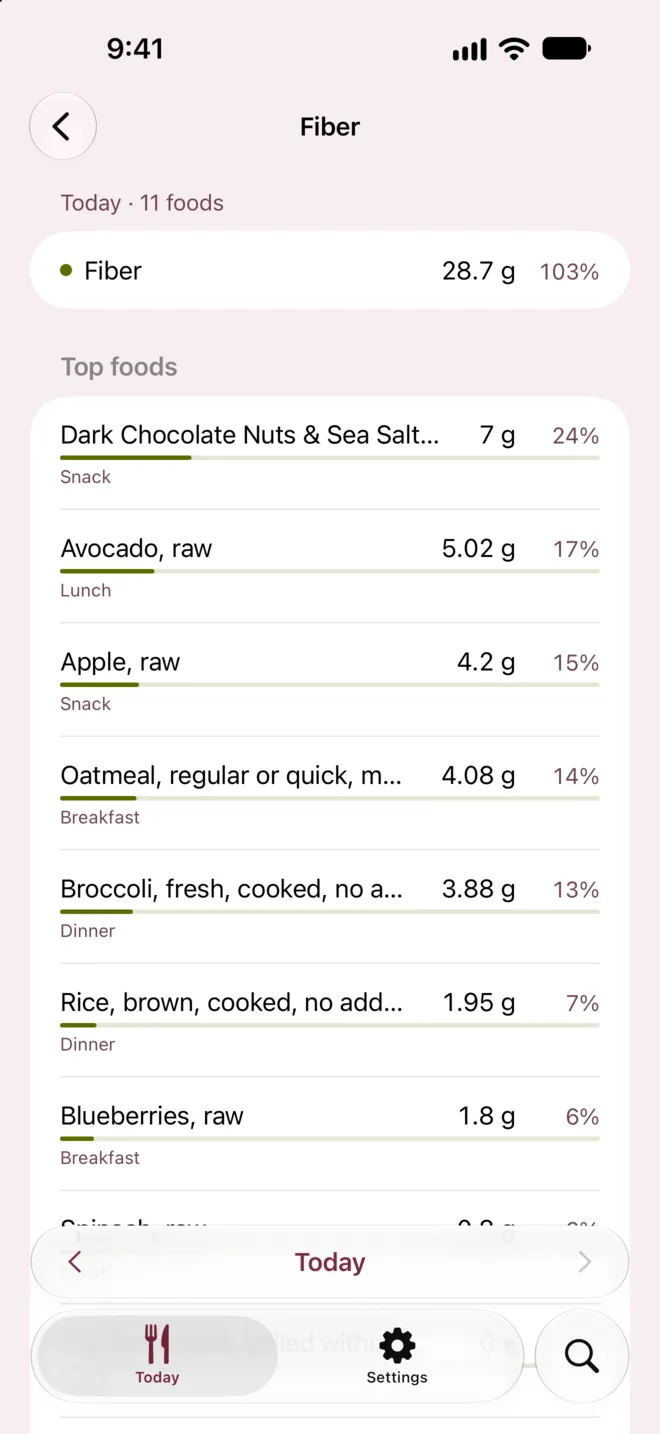
On Today, tap All Nutrients, then Fiber, to see which foods supplied it.
What it can't do
- Foods with no fiber value
- Not counted
- A food that doesn't report fiber adds nothing to the day's total, and All Nutrients shows how many foods reported it.
- Fiber target
- Same every day
- One fiber target applies to every day, so changing it changes past days too.
Questions
Why is my fiber line bold?
Fiber's target is a minimum, so the line turns bold once you reach it. Today never says you went over on fiber.
Does Calorie Tape count net carbs?
No. Carbs are total carbohydrate, fiber included.
Can I turn fiber off?
Yes. Turn off Track fiber in Daily targets to hide fiber on Today. Each food's nutrient list still includes fiber.
Related
Get Calorie Tape
Calorie Tape is on the App Store for iPhone. It needs iOS 27 or later. Every feature is free today.